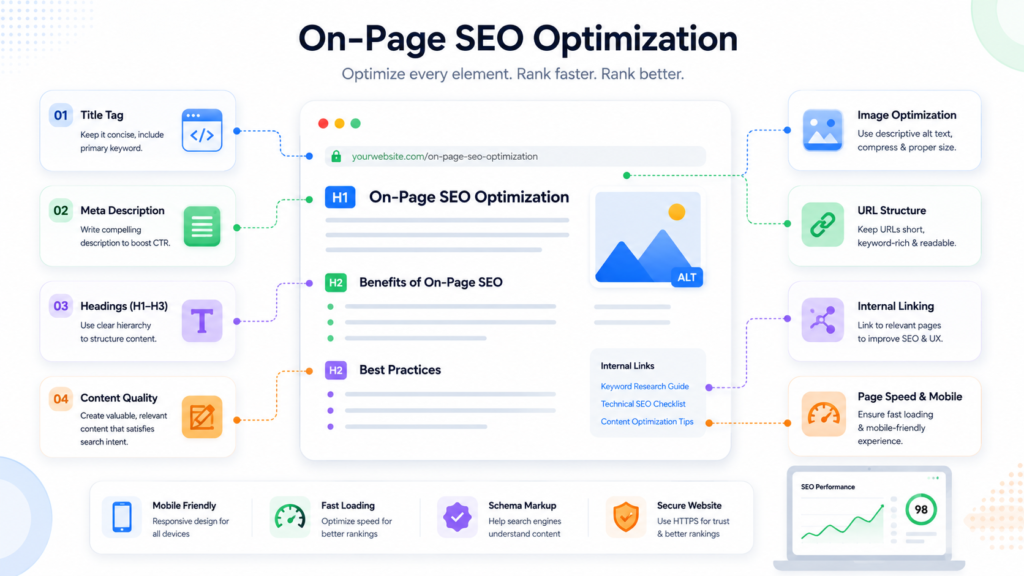
If you’ve ever wondered why two pages targeting the same keyword perform completely differently, the answer usually isn’t the keyword at all. It’s on-page SEO optimization — the collection of small, deliberate decisions made on the page itself, from image filenames to heading structure, that tell both users and search engines exactly what the page is about.
Image SEO is one of the most overlooked pieces of that puzzle. It’s easy to implement, rarely prioritized, and often the first thing left half-finished on a client site. This guide walks through why that happens, the on-page SEO mistake that quietly holds pages back, and a practical framework you can use to fix both.
What On-Page SEO Optimization Actually Covers
Table of Contents
On-page SEO optimization isn’t just “add the keyword to the title.” It’s the full set of elements a visitor and a crawler both interact with on a single page: titles, headings, content depth, internal links, page speed, and images.
Images are part of this because search engines can’t “see” a photo the way a human does. They rely on contextual signals — filenames, alt text, surrounding copy, and file size — to understand what an image shows and how relevant it is to the page. When those signals are missing or generic, the page loses an easy opportunity to rank in both standard search and Google Images.
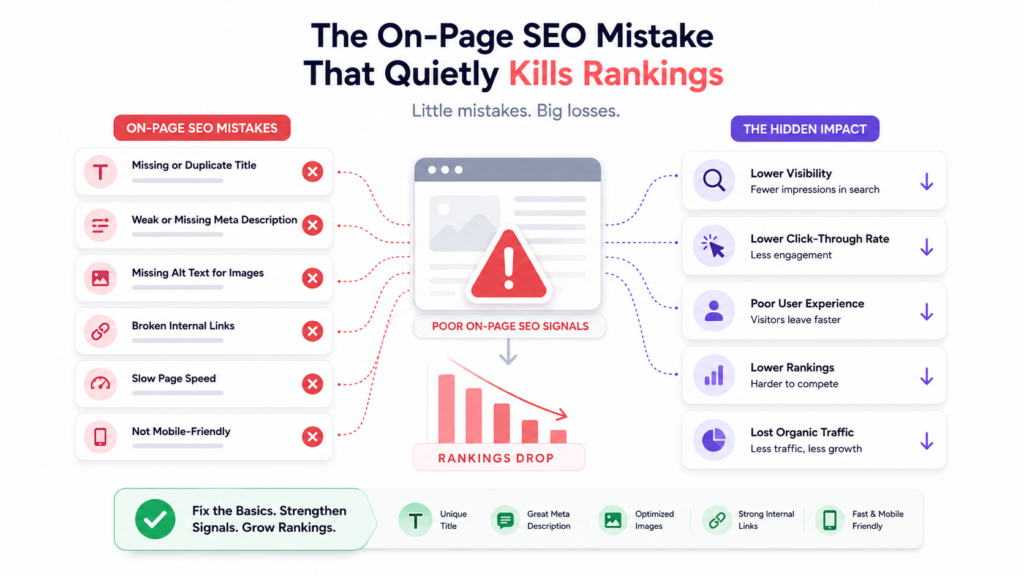
The single most common mistake in on-page SEO optimization is optimizing for the keyword instead of the search intent behind it.
The On-Page SEO Mistake That Quietly Kills Rankings
Take the keyword “on-page SEO optimization” itself. A page chasing the keyword often looks like this:
- A title like “On-Page SEO Optimization | On-Page SEO Optimization Guide”
- The exact phrase repeated in nearly every paragraph
- Generic advice such as “use keywords in headings” or “optimize your meta tags”
- No examples, no checklist, no real depth
Image SEO Fundamentals That Actually Move the Needle
That page technically contains the keyword everywhere it “should” go, and it still won’t rank well, because it never answers what the searcher actually came for: a clear, usable process they can follow. Search engines have gotten much better at detecting this pattern, and recent updates aimed at surfacing genuinely helpful content have made shallow, keyword-repetitive pages even harder to rank. A page built around intent — one that anticipates the reader’s next question and answers it — will consistently outperform a page built around a phrase.
Image optimization is a natural extension of that same principle: make it easy for search engines to understand relevance. A few fundamentals matter most:
“Descriptive filenames. A file named red-running-shoes-nike.jpg gives search engines a direct content signal. A file named IMG_2931.jpg gives them nothing. This is also one of the easiest wins on any site audit, precisely because it’s so often skipped.- Unique alt text per image. Alt text should describe the image accurately and, where natural, reflect the surrounding topic. It also serves accessibility purposes for screen readers, which is reason enough on its own to get it right.
- Compression and modern formats. Converting images to WebP or AVIF and compressing them reduces file size significantly, which directly supports page speed and Core Web Vitals.
- Specified dimensions and lazy loading. Declaring width and height prevents layout shift, and lazy loading defers off-screen images so the initial page load stays fast.
None of these are exotic techniques. They’re straightforward, low-effort changes that are frequently skipped simply because they don’t feel urgent — until page speed or image search traffic becomes a problem worth solving.
A Practical On-Page SEO Optimization Framework
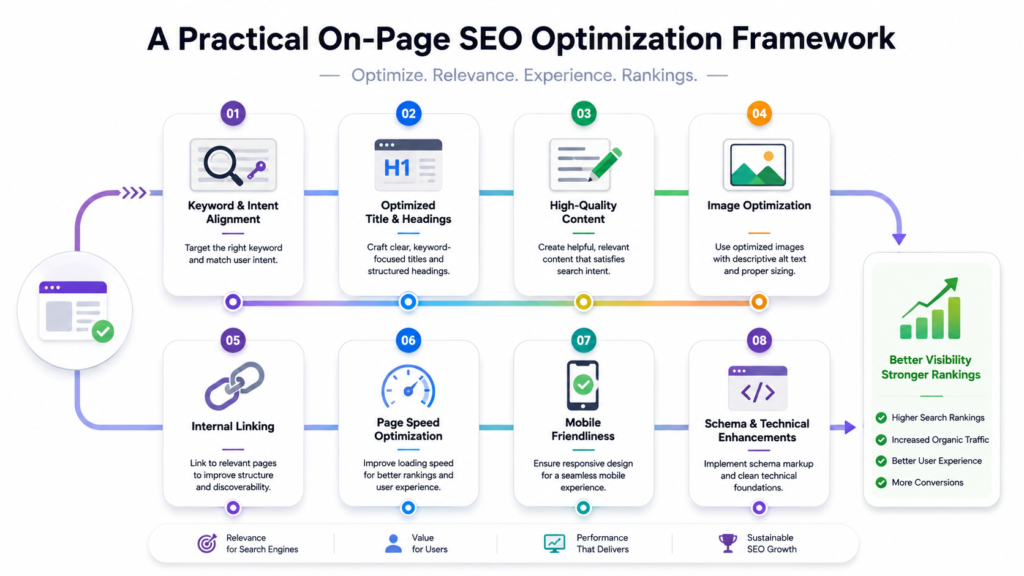
Here’s a sequence that works well for most on-page projects, whether you’re optimizing a new page or auditing an existing one.
1. Identify search intent. Search the primary keyword, review the top-ranking pages, and note whether intent is informational, commercial, transactional, or navigational, along with the common topics and formats being used.
2. Do keyword research. Choose one primary keyword, then gather related secondary and long-tail terms so the content can cover the topic comprehensively instead of repeating one phrase.
3. Optimize page structure. Write a compelling SEO title, one descriptive H1, and a logical H2/H3 hierarchy so the page is easy to scan for readers and crawlers alike.
4. Improve the content itself. Answer the main question early, add examples and actionable advice, include FAQs where relevant, and cut filler.
5. Optimize on-page elements. This is where image SEO lives: write an engaging meta description, optimize images (filenames, alt text, compression, modern formats), use clean URLs, and add schema markup where applicable.
6. Strengthen internal linking. Link to relevant supporting pages, and where possible, link back to this page from related content using descriptive anchor text.
7. Check technical SEO. Confirm mobile responsiveness, page speed, Core Web Vitals, correct indexing and canonical tags, and fix any broken links.
8. Monitor performance. Track organic traffic, keyword rankings, click-through rate, Google Search Console impressions and clicks, and Core Web Vitals after publishing — optimization doesn
On-Page SEO Checklist
| Element | What to Check |
| Title Tag | Primary keyword included, under 60 characters |
| Meta Description | 150–160 characters, includes primary keyword |
| H1 | One per page, includes primary keyword |
| Headings | Logical H2/H3 structure, covers related subtopics |
| Image Filenames | Descriptive, hyphenated, relevant to content |
| Image Alt Text | Unique per image, accurately descriptive |
| Image Format/Size | Compressed, WebP/AVIF, dimensions specified |
| Internal Links | At least one relevant link to related content |
| External Links | At least one authoritative, do-follow reference |
| Schema Markup | Article, FAQ, or How-To where applicable |
| URL | Short, readable, includes primary keyword |
FAQs
Does image SEO really affect rankings, or just image search? It supports both. Well-optimized images can appear in Google Images directly, and the same signals (relevance, page speed, accessibility) contribute to how the overall page is evaluated.
How much text should alt text contain? Enough to describe the image accurately, usually one short sentence. Avoid stuffing keywords into alt text that don’t actually describe what’s shown.
Is keyword density still important? It matters less than it used to. Aim for natural keyword usage that supports readability rather than hitting a specific percentage.
Conclusion
Effective on-page SEO optimization comes down to a simple principle: remove the guesswork for both your reader and the search engine. Structure the page around what the reader actually needs, and make sure every element — including images — reinforces that same topic instead of just repeating a phrase.
Results vary depending on site history, competition, and how consistently these practices are applied, so treat this as a framework to adapt rather than a guaranteed formula. Start with the easiest wins — filenames, alt text, and page structure — and build from there.
Hi, this is a comment.
To get started with moderating, editing, and deleting comments, please visit the Comments screen in the dashboard.
Commenter avatars come from Gravatar.